 AyMINE – Technical documentation

Interfaces to other systems
Enterprise Architect Connector
Business excelenece
Balance Scroecards
Task & Project Control
- Send customer answer in regards to the complaint
- Bundle of Documentation and records
- Test and Inspection Management
- Qualification of user or contact
- Project role
- Methodological framework
- Physical and virtual location management
- My areas
- Kanban Task Overview
- Personal Task
- Internal helpdesk
- Customer Care Centre
- Project baseline
- Return project plan by baseline
- Project Schedule
- Processing time sheets
- Project management items
- Activation buttons
- Why some data can't be deleted
- Starting events
- Qualification of user or contact
- task_taskobjects
- Project
- Reminders and Messages
- eventobj_raisingevents
- decision_decobjects
- eventobj_startingevents
- eventobj_eventbuttons
- Hierarchy of testi types
- Deal management
- FMEA criteria for detection evaluation
- FMEA system functionality analysis
- Methodology how to conduct FMEA
- FMEA analysis of the failure occurence
- Analysis of the FMEA Severity
- Support for FMEA Analysis
- Management of responsibilities - RACI Matrix
- RACI matrix for project
- Improvements and Preventive Measures
- Plan
- Notice – example of use
- tskproblem_terminology
- 8D report - quality problem resolution
- Task Scheduling to the right time and scope
- Administration of the Task Management Module
- Adminitration of areas, projects, calendars
- Discussion
- System rights for the task management module
- Project Planning
- Employee Tasks
- Incident and Quality Issue Management
- Collaborative Resolution of Multiple Problems
- List of business areas
- Required qualifications
- Plan template / strategy
- Management and documentation of the decision
- Configuration Package
- Record template
- Change management process in a project
- Task list
- Requirements
- Team Member
- Right to Manage Qualifications
- Obligation
- Competencies and Skills
- Problems, tickets and their management
- Meeting
- Package definition
- Terminology and Nomenclature
- Data Area
- Risk
- Task
- Business event
- Task, project & quality management
- Records and protocols
- Directives and Policies
- Events
- Risk Pattern
- Information
- Project definition
- Activity log
- eventinstances
- Personal calendar
- Objects of decision making
- Event activation buttons
- Objects affected by the problem
- Variant decision-making
- Recorded activities
- Self-Reminders
- Assignment of a New Task According to Methodology
- Objects related to the task pattern
- Effect of the task on the right to modify the atta
- Level of Competence
- Manager approval with the task report
- Region / project / methodology
- Manage your marks
- Task patterns saves work and improve quality
- Management system
- Task planning both in project and daily business
- Project Team
- Events and meetings
- Events and meetings
- List of event instances
- moduleclientoptions
- Processed objects
- Mark patterns
Interprocess management
Human Resources
- roles
- Staffer / Worker Management
- Human resources
- Employee access to the contract files
- Personalistics - User Permissions and roles
- Candidates Management
- Manage department / division data
- Job Position
- Employee dashboard with personal data
- An overview of your staff
- Responsible HR Manager
- Synchronizing staff and system users
- Management of the staffer contracts
- Safety of the HR module
Asset Management
- Products, assets and sales
- Tendering and purchasing
- Analytical model
- Product Supplier
- Product Categories
- Product or Product Property
- Manage projects by goals
- Create offer for premium or B2B clients
- Offers summaries
- Create and recalculate offer using price lists
- Offer and Price Access Rights
- Creating and processing orders
- System order status query
- Order Reports
- Pricing
- Pricing – volume discounts
- Products and Goods
- Product status and change
- Product units
- Definition and Control Quality Criteria
- Why Quality Criteria is a requisite part of QMS
- DFEMA - FMEA of the product design
- HARA for product
Customer Relationship - CRM
- Contacts and directories module (
- System Permissions and CRM Module Settings
- Customer Order Overview
- Address book management and protection
- Address book list and management
- Privacy policy
- Send bulk messages in accordance with GDPR
- Link in bulk message to set preferences or unsubscribe
- GDPR: Support to set preferences over the web
- GDPR: Support for subject forgetting
- Sending Bulk Emails - manual
- Contracts
- Partner in a contract
- Generate messages from system with patterns and AI
- Group of contacts from address books for better management
- Evidence of contacts and related business data
Finance management
System modules
System management
- moduleclientoptions
- Electronic sign even on mobile device
- formattedtexts
- System Configuration
- Processes in use
- Client
- Member Management for churches, non-profit organisations
- Configure gateways for external messages
- Corporate email and communication processing
- Email messages
- Rules for external messages
- Secure business communication
- Sending SMS directly from CRM
- Call directly from CRM
- Documents and files
- Additional functions with files
- Copying and moving files between objects
- Picture presentation
- Public link to the document
- Recent Files
- Dashboard
- Object location on the board
- Client items
- Revisions and comments
- Securing posts and internal discussions
- Translations
- Record Relationships
- Relation types
- System Groups and Teams for rights settings
- User Processes
- System module
- System User
- User administration
- User Administration
- Connecting users to VOIP PBX
- Trusted User Device
- Secure Key Wallet - Safe storage for digital keys
- Data vault for Company secret & Classified data storage
Framework
- AyMINE frm module - corestone of the ecosystem
- Description of the view of the record details
- Private Notes to Records that no one can read
- AyMINE Access control and security
- Introduction to the application
- Using Drag & Drop even on mobile devices
- AyMINE icons are language for fast orientation
- Delete object to the trash
- Principal dashboard
- Settings your own configuration
- AyMINE Gestures and Keyboard Shortcuts
- AyMINE User Rights Control
- Install AyMINE to windows
- About AyMINE
- Work with list of records
- AyMINE on mobile device
- List of records
- How filtering in lists works
- cliplink
- System rights
- Module is the principal brick of the aymine ecosystem
Task Scheduling
Task scheduling allows tasks to be arranged chronologically based on their dependencies.
Example of the scheduled tasks
To schedule tasks, use the schedule view – see link, which provides functions for automatic scheduling.
The system schedules the task to have the required duration and to be timed between its predecessors and successors.
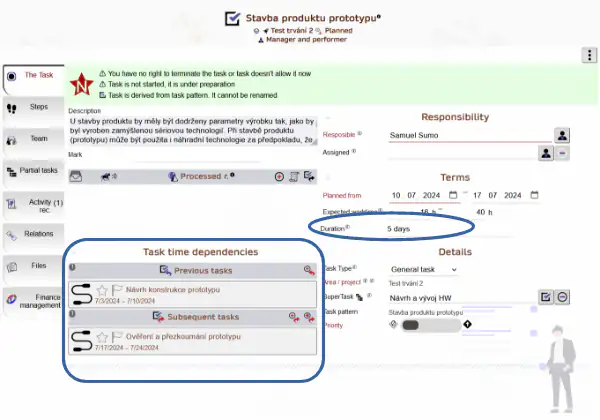
To check how many tasks are assigned to a specific worker, review the task overview for that worker. This check can only be performed by the supervisor for their team members (or a worker with global permissions).
Task relationship importance
Task is linked with records that are managed by it (e.g. contract, requirement etc.). Thanks to that,
- Progress of the task is visible also at the principal record
- Processing of the principal record is controllable
- Task can be stopped or postponed if the major records becomes obsolete, invalid or there is other block on that
Scheduling of the task is managed also according to the dependencies - major record defines priority and importance of the task.
Notes:
- Scheduling works for any tasks, even outside projects. However, it is most effective within projects.
- Only the project manager or area manager can schedule tasks. Other workers can change the estimated duration of their tasks but cannot reschedule them.