 AyMINE – Technical documentation

Interfaces to other systems
Enterprise Architect Connector
Business excelenece
Balance Scroecards
Task & Project Control
- Send customer answer in regards to the complaint
- Bundle of Documentation and records
- Test and Inspection Management
- Qualification of user or contact
- Project role
- Methodological framework
- Physical and virtual location management
- My areas
- Kanban Task Overview
- Personal Task
- Internal helpdesk
- Customer Care Centre
- Project baseline
- Return project plan by baseline
- Project Schedule
- Processing time sheets
- Project management items
- Activation buttons
- Why some data can't be deleted
- Starting events
- Qualification of user or contact
- task_taskobjects
- Project
- Reminders and Messages
- eventobj_raisingevents
- decision_decobjects
- eventobj_startingevents
- eventobj_eventbuttons
- Hierarchy of testi types
- Deal management
- FMEA criteria for detection evaluation
- FMEA system functionality analysis
- Methodology how to conduct FMEA
- FMEA analysis of the failure occurence
- Analysis of the FMEA Severity
- Support for FMEA Analysis
- Management of responsibilities - RACI Matrix
- RACI matrix for project
- Improvements and Preventive Measures
- Plan
- Notice – example of use
- tskproblem_terminology
- 8D report - quality problem resolution
- Task Scheduling to the right time and scope
- Administration of the Task Management Module
- Adminitration of areas, projects, calendars
- Discussion
- System rights for the task management module
- Project Planning
- Employee Tasks
- Incident and Quality Issue Management
- Collaborative Resolution of Multiple Problems
- List of business areas
- Required qualifications
- Plan template / strategy
- Management and documentation of the decision
- Configuration Package
- Record template
- Change management process in a project
- Task list
- Requirements
- Team Member
- Right to Manage Qualifications
- Obligation
- Competencies and Skills
- Problems, tickets and their management
- Meeting
- Package definition
- Terminology and Nomenclature
- Data Area
- Risk
- Task
- Business event
- Task, project & quality management
- Records and protocols
- Directives and Policies
- Events
- Risk Pattern
- Information
- Project definition
- Activity log
- eventinstances
- Personal calendar
- Objects of decision making
- Event activation buttons
- Objects affected by the problem
- Variant decision-making
- Recorded activities
- Self-Reminders
- Assignment of a New Task According to Methodology
- Objects related to the task pattern
- Effect of the task on the right to modify the atta
- Level of Competence
- Manager approval with the task report
- Region / project / methodology
- Manage your marks
- Task patterns saves work and improve quality
- Management system
- Task planning both in project and daily business
- Project Team
- Events and meetings
- Events and meetings
- List of event instances
- moduleclientoptions
- Processed objects
- Mark patterns
Interprocess management
Human Resources
- roles
- Staffer / Worker Management
- Human resources
- Employee access to the contract files
- Personalistics - User Permissions and roles
- Candidates Management
- Manage department / division data
- Job Position
- Employee dashboard with personal data
- An overview of your staff
- Responsible HR Manager
- Synchronizing staff and system users
- Management of the staffer contracts
- Safety of the HR module
Asset Management
- Products, assets and sales
- Tendering and purchasing
- Analytical model
- Product Supplier
- Product Categories
- Product or Product Property
- Manage projects by goals
- Create offer for premium or B2B clients
- Offers summaries
- Create and recalculate offer using price lists
- Offer and Price Access Rights
- Creating and processing orders
- System order status query
- Order Reports
- Pricing
- Pricing – volume discounts
- Products and Goods
- Product status and change
- Product Units
- Definition and Control Quality Criteria
- Why Quality Criteria is a requisite part of QMS
- DFEMA - FMEA of the product design
- HARA for product
Customer Relationship - CRM
- Contacts and directories module (
- System Permissions and CRM Module Settings
- Customer Order Overview
- Address book management and protection
- Address book list and management
- Privacy policy
- Send bulk messages in accordance with GDPR
- Link in bulk message to set preferences or unsubscribe
- GDPR: Support to set preferences over the web
- GDPR: Support for subject forgetting
- Sending Bulk Emails - manual
- Contracts
- Partner in a contract
- Generate messages from system with patterns and AI
- Group of contacts from address books for better management
- Evidence of contacts and related business data
Finance management
System modules
System management
- moduleclientoptions
- Electronic sign even on mobile device
- formattedtexts
- System Configuration
- Processes in use
- Client
- Member Management for churches, non-profit organisations
- Configure gateways for external messages
- Corporate email and communication processing
- Email messages
- Rules for external messages
- Secure business communication
- Sending SMS directly from CRM
- Call directly from CRM
- Documents and files
- Additional functions with files
- Copying and moving files between objects
- Picture presentation
- Public link to the document
- Recent Files
- Dashboard
- Object location on the board
- Client items
- Revisions and comments
- Securing posts and internal discussions
- Translations
- Record Relationships
- Relation types
- System Groups and Teams for rights settings
- User Processes
- System module
- System User
- User administration
- User Administration
- Connecting users to VOIP PBX
- Trusted User Device
- Secure Key Wallet - Safe storage for digital keys
- Data vault for Company secret & Classified data storage
Framework
- AyMINE frm module - corestone of the ecosystem
- Description of the view of the record details
- Private Notes to Records that no one can read
- AyMINE Access control and security
- Introduction to the application
- Using Drag & Drop even on mobile devices
- AyMINE icons are language for fast orientation
- Delete object to the trash
- Principal dashboard
- Settings your own configuration
- AyMINE Gestures and Keyboard Shortcuts
- AyMINE User Rights Control
- Install AyMINE to windows
- About AyMINE
- Work with list of records
- AyMINE on mobile device
- List of records
- How filtering in lists works
- cliplink
- System rights
- Module is the principal brick of the aymine ecosystem
Working procedure – task definition
The Working procedure is a specification of the part of a process with all components required for the task execution in the appropriate level of quality.
- A workflow description
- Task patterns
- Task Team
- Multilingual quality system
- How a new task is created from a pattern
- Relationships between tasks
- Sample Budget Items
- Multiple languages
- More information
FAQ about task patterns / working procedures
Did you get a blank list of sample tasks?
This is not a system error, but there is no sample task available. Either a suitable methodology is not selected for the area or project, or the methodology does not contain any sample tasks for this type of object. You can create a new task for the objects without a pattern link.
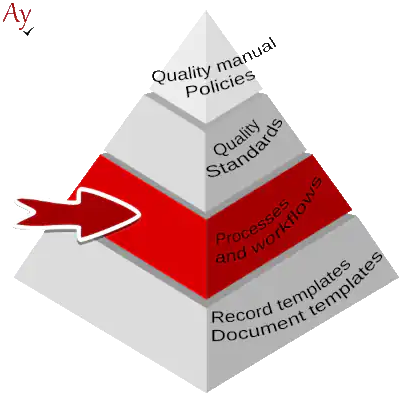
The working procedure goes beyond the scope of the regular task description because. Apart of the work steps the description supports definition of a complete sequence of steps and link them to all the running records. It thus fully fulfils the process level of IQMS structured documentation.
A workflow description
The workflow defines part of a task. It is defined by a list of linked subtasks or event deeper hierarchy of tasks. When a real workflow execution is created accoring to the workging procedure, the whole hierarchy of tasks is created, including the dependencies between them.
Examples of compound tasks
Project Stage – Getting Started
Project initiation is a separate stage that includes a number of separate tasks:
- Assessment of project specifics
- Generating a project plan.
- Modifying task assignments – "tailoring".
- Risk analysis
- …
All tasks related to the initiation should be part of one task – stage.
Annual internal audit plan
A sample plan is described as a sample task. Individual periodic audits are separate tasks.
Note: The execution of all internal audits follows the same procedure. From an administrative perspective, it would not be efficient to write this procedure separately for all tasks. Therefore, it is possible to attach a methodology to the sample task to be followed. In this case, the methodology should include the workflow of one internal audit.
Name and Description
The name of the task pattern is copied as the name of the task. It should therefore be exactly as the task itself should be named. (Example: Perform a FMEA Security Risk Assessment).
Brief Description (Annotation)
The description will be seen by the staff in the task overview and on the mobile phone. It should therefore be brief but clear at the same time, so as not to confuse what it is based on. (Example: Perform an introductory FMEA to determine the required level of safety SIL of the product).
The length of the brief description is limited to 300 characters.
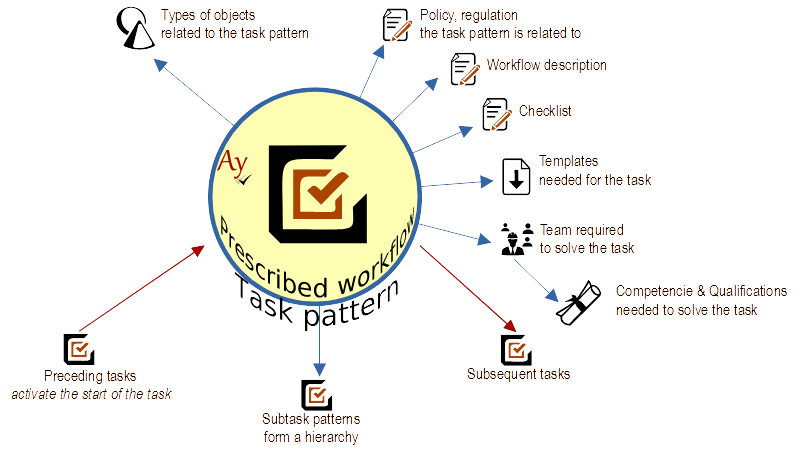
Related Objects
Related objects in the introductory tab describe to which object the task refers.
Correct definition is very important because wrong task definition leads people wrongly. How to correctly determine a related object to a task pattern.
Task patterns
The task pattern defines the task assignment, possibly supplemented by:
a* Procedure instructions on the  Steps tab.
- Document templates to be used on between
 File
File - Another description of why the task is necessary on the
 Tasks tab.
Based on the template, the task will be created if someone manually initiates it, or automatically events. To specify automatic triggering, use the Event Binding that triggers on the  Events tab.
Workflow steps
The _steps tab should be used to indicate the entire workflow for the team to follow.
If the task pattern is structured into sub-tasks, always indicate the procedure for each sub-task. Never duplicate the description in the main task.
Document templates
- Document templates to be used insert between File
- Another description of why the task is necessary on the Tasks tab.
Checklist
The checklist is a description of the steps the task team should take to verify that everything has been done as it should be.
The checklist is copied into the task and the implementing team has the opportunity to fill in the results of the check. It is therefore appropriate to use bullet points directly to confirm that the team has carried out the check. Remember, however, that the bullets should be ticked by someone from the team after each task is completed. It is therefore not advisable to make many of them, because then the worker will be busy ticking instead of checking.
If a sample task has sub-tasks, it is usual for the checklist to have only the last task – for more complex samples it is advisable to put a special verification task at the end. It is useful to combine the verification with, for example, a milestone ending the task
Events
On the Events tab, the business event that starts the task is defined.
Task Team
The workflow defines where everything is involved in solving the task – the task team Within the team you define which team roles are to be involved – e.g. approver, reviewer (verifier). For each team role, you also define the qualifications of the person to be assigned to the role.
If the workflow involves a project task, you assign a role in the task and a project role. When the project plan is generated, the worker from the project team will then be assigned directly to the task team.
More about task teams can be found here.
Sample task relationships
Relationships describe what other components of the methodology (or even other methodologies) are related to the pattern. Relationships are primarily used to manage the sample task.
How to use links between template tasks
Where to use links
- Link a task to other sample tasks that are logically related. For example, if a task processes information generated by another task, it is important to maintain a link between them. When one of them is changed, it is then easy to check the other and assess the effects of the change on the other
- Link to plans that relate to the use of the task
What not to use links for
Don't link to the obligation from which the sample task derives, This link is on the introductory tab (Reasons and Regulations)
Neither should the link to the methodology that the preparer is to follow appear here, as it has its place on the introductory page.
Based on the template, the task will be created if someone manually initiates it or automatically events. To specify automatic triggering, use the Event Binding that triggers on the Events tab.
Multilingual quality system
For multinational teams, but also for deliveries to foreign clients, it is important to have a multilingual methodology. It is not always possible to rely on everyone in the team to read English well enough not to be held back in their work. When you prepare translations for them, you can be sure they know exactly what to do.
Each task pattern and methodology can be saved in any number of languages. Workers will then see the translations in whichever language they choose.
Objects directly support multiple languages, so you don't have to deal with the issue of different versions of the documentation – the sample task is the same, and has the same number. And the user will see both the English original and the Czech translation at the same time. More about the possibility of language versions here.
How a new task is created from a pattern
- The most common way is for a user to create a task within a project or area using the Create Task from Pattern function. Tasks created in this way always belong to the area in which they were created. The user can use patterns from any methodology that is attached to the area.
- A task from a pattern can be created either by people who have the right to the area where the pattern is. They can use the Task button to create a task.
- A task can be created automatically when the event that triggers it occurs. Tasks created in this way are created in the areas and projects where the methodology is attached. One task is created in each active area/project for one trigger event. The task is assigned to people according to the role they are assigned.
- A task can also be created semi-automatically when someone triggers the event that starts the task. To be triggered by an event, the worker does not need to have any rights to the area where the pattern is, nor does he need to know that the pattern exists.
For methods 3 and 4, at least 1 triggering event needs to be associated with the task.
You can read who gets the project task here.
Relationships between tasks
Pattern tasks can be interconnected by continuities that express the order in which the tasks that are based on them are to proceed. When tasks are created, these dependencies are carried over and are also present between created tasks. Once tasks are created, they are then scheduled so that tasks following another task are scheduled after the previous ones. In order for scheduling to work properly, it is essential that the sample tasks have not only sequences specified, but also the expected duration of the activity.
The relationships between the sample tasks carry over even if the tasks are not created at the same time. If you create a t1 → t2 pattern relationship (the t2 task created from task pattern tp2 is supposed to follow the t1 created from tp1), then you create t1 and sometime later you create t2 so that when you create t2 it will be traced in the t1 area and a link will be created between them.
You can then change the bindings between the created tasks in the project/area independently of the patterns. The templates contain pattern processing, but the project manager or the manager responsible for the area has the possibility to modify the links and the order of the tasks for actual needs.
Sample Budget Items
In the Finance Management tab, there can be templates for budget items. These templates are used to create budget items in tasks that are created based on the sample.
Multiple languages
If you have a team made up of people of different nationalities, we recommend that you create the methodology in languages that they really understand well. When you prepare translations for them, you can be sure that they will know exactly what to do.
You can save each sample task and methodology in different languages. The staff will then see the translations depending on which language they choose as their own.
More information
The workflow is part of the methodology or documentation of the quality management system. More information about the methodology can be found here.