 AyMINE – Technical documentation

Interfaces to other systems
Enterprise Architect Connector
Business excelenece
Balance Scroecards
Task & Project Control
- Send customer answer in regards to the complaint
- Bundle of Documentation and records
- Test and Inspection Management
- Qualification of user or contact
- Project role
- Methodological framework
- Physical and virtual location management
- My areas
- Kanban Task Overview
- Personal Task
- Internal helpdesk
- Customer Care Centre
- Project baseline
- Return project plan by baseline
- Project Schedule
- Processing time sheets
- Project management items
- Activation buttons
- Why some data can't be deleted
- Starting events
- Qualification of user or contact
- task_taskobjects
- Project
- Reminders and Messages
- eventobj_raisingevents
- decision_decobjects
- eventobj_startingevents
- eventobj_eventbuttons
- Hierarchy of testi types
- Deal management
- FMEA criteria for detection evaluation
- FMEA system functionality analysis
- Methodology how to conduct FMEA
- FMEA analysis of the failure occurence
- Analysis of the FMEA Severity
- Support for FMEA Analysis
- Management of responsibilities - RACI Matrix
- RACI matrix for project
- Improvements and Preventive Measures
- Plan
- Notice – example of use
- tskproblem_terminology
- 8D report - quality problem resolution
- Task Scheduling to the right time and scope
- Administration of the Task Management Module
- Adminitration of areas, projects, calendars
- Discussion
- System rights for the task management module
- Project Planning
- Employee Tasks
- Incident and Quality Issue Management
- Collaborative Resolution of Multiple Problems
- List of business areas
- Required qualifications
- Plan template / strategy
- Management and documentation of the decision
- Configuration Package
- Record template
- Change management process in a project
- Task list
- Requirements
- Team Member
- Right to Manage Qualifications
- Obligation
- Competencies and Skills
- Problems, tickets and their management
- Meeting
- Package definition
- Terminology and Nomenclature
- Data Area
- Risk
- Task
- Business event
- Task, project & quality management
- Records and protocols
- Directives and Policies
- Events
- Risk Pattern
- Information
- Project definition
- Activity log
- eventinstances
- Personal calendar
- Objects of decision making
- Event activation buttons
- Objects affected by the problem
- Variant decision-making
- Recorded activities
- Self-Reminders
- Assignment of a New Task According to Methodology
- Objects related to the task pattern
- Effect of the task on the right to modify the atta
- Level of Competence
- Manager approval with the task report
- Region / project / methodology
- Manage your marks
- Task patterns saves work and improve quality
- Management system
- Task planning both in project and daily business
- Project Team
- Events and meetings
- Events and meetings
- List of event instances
- moduleclientoptions
- Processed objects
- Mark patterns
Interprocess management
Human Resources
- roles
- Staffer / Worker Management
- Human resources
- Employee access to the contract files
- Personalistics - User Permissions and roles
- Candidates Management
- Manage department / division data
- Job Position
- Employee dashboard with personal data
- An overview of your staff
- Responsible HR Manager
- Synchronizing staff and system users
- Management of the staffer contracts
- Safety of the HR module
Asset Management
- Products, assets and sales
- Tendering and purchasing
- Analytical model
- Product Supplier
- Product Categories
- Product or Product Property
- Manage projects by goals
- Create offer for premium or B2B clients
- Offers summaries
- Create and recalculate offer using price lists
- Offer and Price Access Rights
- Creating and processing orders
- System order status query
- Order Reports
- Pricing
- Pricing – volume discounts
- Products and Goods
- Product status and change
- Product units
- Definition and Control Quality Criteria
- Why Quality Criteria is a requisite part of QMS
- DFEMA - FMEA of the product design
- HARA for product
Customer Relationship - CRM
- Contacts and directories module (
- System Permissions and CRM Module Settings
- Customer Order Overview
- Address book management and protection
- Address book list and management
- Privacy policy
- Send bulk messages in accordance with GDPR
- Link in bulk message to set preferences or unsubscribe
- GDPR: Support to set preferences over the web
- GDPR: Support for subject forgetting
- Sending Bulk Emails - manual
- Contracts
- Partner in a contract
- Generate messages from system with patterns and AI
- Group of contacts from address books for better management
- Evidence of contacts and related business data
Finance management
System modules
System management
- moduleclientoptions
- Electronic sign even on mobile device
- formattedtexts
- System Configuration
- Processes in use
- Client
- Member Management for churches, non-profit organisations
- Configure gateways for external messages
- Corporate email and communication processing
- Email messages
- Rules for external messages
- Secure business communication
- Sending SMS directly from CRM
- Call directly from CRM
- Documents and files
- Additional functions with files
- Copying and moving files between objects
- Picture presentation
- Public link to the document
- Recent Files
- Dashboard
- Object location on the board
- Client items
- Revisions and comments
- Securing posts and internal discussions
- Translations
- Record Relationships
- Relation types
- System Groups and Teams for rights settings
- User Processes
- System module
- System User
- User administration
- User Administration
- Connecting users to VOIP PBX
- Trusted User Device
- Secure Key Wallet - Safe storage for digital keys
- Data vault for Company secret & Classified data storage
Framework
- AyMINE frm module - corestone of the ecosystem
- Description of the view of the record details
- Private Notes to Records that no one can read
- AyMINE Access control and security
- Introduction to the application
- Using Drag & Drop even on mobile devices
- AyMINE icons are language for fast orientation
- Delete object to the trash
- Principal dashboard
- Settings your own configuration
- AyMINE Gestures and Keyboard Shortcuts
- AyMINE User Rights Control
- Install AyMINE to windows
- About AyMINE
- Work with list of records
- AyMINE on mobile device
- List of records
- How filtering in lists works
- cliplink
- System rights
- Module is the principal brick of the aymine ecosystem
Integrated Management System
- What Is a Integrated Management System?
- Examples of Standards Implemented by a QMS
- Creating a Management system – Video Guide
- More Information About the management system development
What Is a Integrated Management System?
The Management System is a tool for standardizing the way work is planned, orgnised and performed and for guiding both management and employees to use proven and well-established goals, procedures and tools.
In addition to standardization, a management system explicitly defines a set of mandatory processes, including the obligation to monitor and evaluate quality. Virtually all quality standards assume that organizations have a system in place for task management and activity tracking. This is precisely where AyMINE significantly simplifies your work.
Management system is splitted to the Methodological frameworks that foucses on sepcific parts of the management, e.g. quality (QMS). Each methodological framework is usually based on some general standards (for QMS it is ISO 9001, for information management ITIL or ISO 27000 etc.).
Automation of Quality Management Processes
The automation of all processes pursues a single goal: to carry out as much work as possible automatically and to organize the remaining activities so that they run smoothly and require minimal effort.Automation in AyMINE collects all required evidence, monitors deadlines and compliance with other requirements, and ensures task management in full alignment with defined working procedures.AyMINE integrates task management with QMS administration, as tasks in AyMINE are derived directly from QMS documentation.
The image below illustrates all elements that belong to quality management (click to navigate to a page describing the individual components in detail):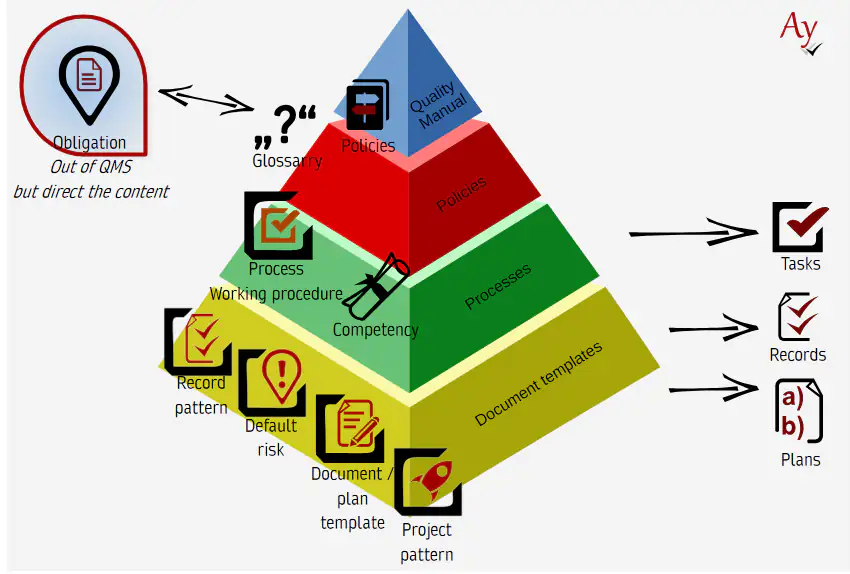
The methodology itself is not a single document, but a structured set of objects, one of which may be a policy.
Examples of Standards Implemented by a QMS
A QMS typically implements selected standards that are relevant and meaningful for the organization.
- Quality Management System according to ISO 9001 – no QMS can exist without it or one of its variants
- Project methodology based on ISO 26262 / Automotive SPICE; PMBOK or PRINCE2 are also frequently used, although they are not ISO standards, they serve a similar purpose
- IT management system in accordance with ITIL
Standards provide the process framework; however, the core of a QMS consists of high-quality methodological procedures. These are defined by process owners, typically managers. Examples of such methodological procedures include:
- Handling of non-standard accounting cases (e.g. advance payments)
- Handling of helpdesk requests – helpdesk methodology (appropriate response to employee needs and to identified or reported incidents)
- Complaint handling procedures (standardized approaches to recurring customer issues)
The complete set of obligations, policies, and other components together forms a methodology. For practical reasons, methodologies are grouped according to their intended purpose, for example:
- Project management methodology
- Helpdesk methodology
- Administrative department methodology
Each methodology is owned by the head of the respective division or department. The QMS provides the overarching framework for all methodologies.
Creating a Management system – Video Guide
Training on how to create methodologies is available in video form. You can watch the complete video here. The AyMINE system is continuously evolving, so the video may not reflect the latest state in every detail, but it clearly demonstrates the core principles.
How is the management system deceloped
Management system, split to several methodological frameworks contain several required types of records. The workspace shows records currently in progress, while the complete management system consists of all records ranging from policies to working procedures.Work on a methodology typically starts either from an obligation (external standards and regulations) or from a practical need (problems to be solved).
When starting from an obligation, the process begins with a policy that translates the requirement into organizational conditions, followed by templates, working procedures, and recommendations.When starting from a need, the first step is a working procedure that addresses the identified requirement. Either a relevant policy already exists and the working procedure is created in compliance with it, or individual procedures are collected and general principles are subsequently consolidated into a policy.
Example of an ISO 26262-based methodology
The image below shows a preview of a project methodology based on ISO 26262: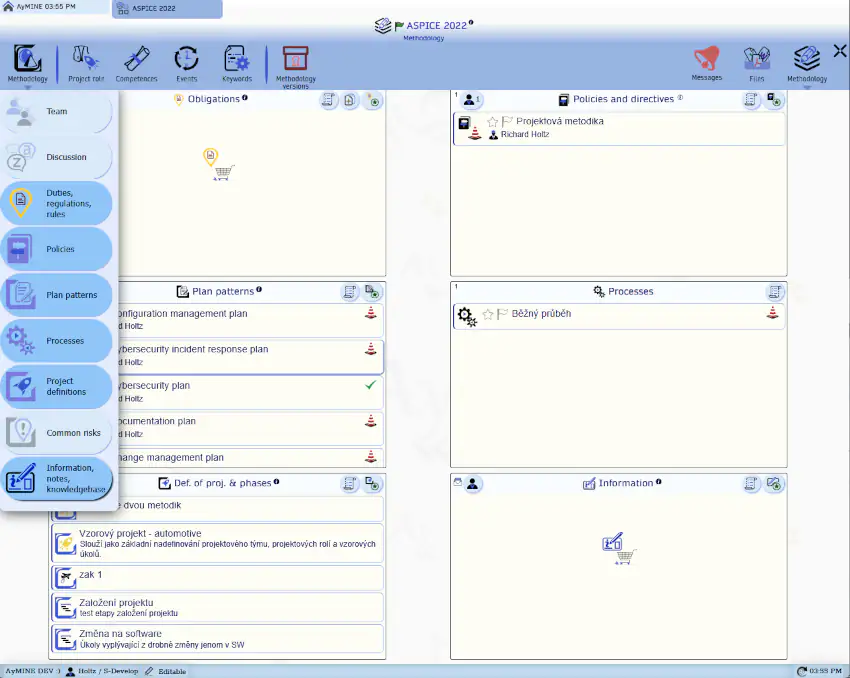
Purchasing a Ready-Made Methodology?
A methodological framework may also be acquired from an external provider. In this case, you do not create the the framweork yourself but only use it. Even then, it is essential to carefully review where it meets your requirements and where it does not. Certified standards and frameworks (e.g. ISO 9001 or partially ITIL) are designed to define requirements rather than specific procedures. Commercial methodologies, on the other hand, often define detailed procedures as well. Therefore, they must be approached differently than purely normative frameworks and adapted to ensure effective operation within your organization.
AyMINE provides methodologies for a wide range of standards. It is always assumed that you will adapt them—or that we will assist you in tailoring them—to meet your specific needs.
More Information About the management system development
- Learn more about methodologies and their importance for quality management here
- Records that make up quality management systems – corporate methodologies
- Keywords help you automate your work based on the methodology